
In this article
- How Call Tracking Software Works
- Why Call Tracking Matters for Service Businesses
- The Features That Actually Matter
- How the Popular Call Tracking Tools Compare
- What Does Call Tracking Software Cost?
- How to Set Up Call Tracking the Right Way
- Make Sure Every Tracked Call Becomes a Lead
- How Call Tracking Works With Bluu
- A Quick Call Tracking Buying Checklist
- Frequently Asked Questions
- The Bottom Line
Ask a contractor, a clinic or a law firm where their best customers come from and the answer is usually the same: they called. Yet most local businesses have no idea which ad, search or post made the phone ring. Call tracking software fixes that, and for a service business it is often the single most valuable piece of marketing technology you can add.
This buyer's guide explains how call tracking works, the features that actually matter, how the popular tools differ, what it typically costs, and how to make sure every tracked call becomes a lead someone follows up.
Key takeaways
- Call tracking software shows which ad, search or campaign produced each phone call, so you can measure the channel that matters most.
- Look for dynamic number insertion, call recording, missed call alerts and integrations with Google Ads, Google Analytics and your CRM.
- Published entry plans for popular tools start from roughly $30 to $80 a month, before extra numbers and minutes.
- Tracking a call is only half the job. Every call needs to land as a lead your team will act on.
How Call Tracking Software Works
Call tracking gives you a pool of phone numbers that all forward to your real business line. Each number is tied to a source, so when someone calls it, the software knows where they came from.
- Static numbers are fixed numbers for one source, such as a flyer, a truck wrap or your Google Business Profile.
- Dynamic number insertion swaps the number shown on your website depending on how the visitor arrived, so someone who clicked a Google ad sees one number and someone from Facebook sees another. This is how you track website calls back to individual campaigns, and even keywords.
When the call comes in, the software records the source, the caller's number, the time and the length of the call, and usually a recording. Many tools now add transcripts and AI summaries too.
Why Call Tracking Matters for Service Businesses
For trades, clinics, salons, law firms and most other local businesses, a phone call is the highest intent lead there is. Someone who calls is usually ready to book.
Without call tracking, your reports only show the leads that came through forms and chats, and the channels producing phone calls look worse than they really are. Businesses regularly cut campaigns that were quietly producing most of their calls. Call tracking puts phone leads back into the picture, which is the foundation of proper marketing lead tracking.
The Features That Actually Matter
Source and Keyword Attribution
At minimum, you need to know which channel produced each call. Better tools go further and tell you which campaign and keyword produced it, which is what lets you optimize Google Ads properly.
Call Recording and Transcripts
Recordings let you hear how calls are handled and settle questions about what was said. Transcripts and AI summaries make them searchable, so you can find every call that mentioned a particular service.
Missed Call Alerts
A missed call is a lost lead unless somebody calls back. The best setups flag missed calls clearly so they are returned fast. Our guide to lead response time explains why minutes matter.
Integrations
Calls should flow into Google Ads as conversions, into Google Analytics as events and into your CRM as leads. A call tracking tool that keeps its data to itself creates another inbox to check.
Recording Consent
If you record calls, you need to follow the law. Florida is one of the states that requires every party on a call to consent to recording, so a short greeting that tells callers the call may be recorded is important for South Florida businesses, and good practice everywhere.

How the Popular Call Tracking Tools Compare
There is no single best tool for everyone. Here is how the best known options are generally positioned, so you can shortlist the right kind. Features and plans change often, so check each vendor's current pricing page before you buy.
| Tool | Generally best for | What stands out |
|---|---|---|
| CallRail | Small and mid-sized businesses and agencies | Widely used, easy setup, strong Google Ads and CRM integrations |
| WhatConverts | Businesses that want calls, forms and chats in one report | Tracks several lead types together, popular with agencies |
| CallTrackingMetrics | Teams that also need call routing and contact center tools | Call tracking combined with routing, queues and agent features |
| Invoca | Larger companies with high call volumes | Enterprise conversation intelligence and analytics |
How the best known call tracking tools are generally positioned. Check each vendor for current plans.
For most local service businesses, the real choice is between the first two or three. Enterprise platforms are built for call volumes and teams far bigger than a typical local business.
What Does Call Tracking Software Cost?
Most tools charge a monthly base price plus usage. At the time of writing, published entry plans for popular tools start from roughly $30 to $80 a month, with extra charges for additional tracking numbers, call minutes, text messages and advanced features such as AI transcription. Your real cost depends on how many numbers you need and how many minutes you use.
When you compare quotes, estimate a realistic month: how many numbers for your channels, how many calls, and how long they last. That number, not the headline price, is what you will actually pay.
How to Set Up Call Tracking the Right Way
- List your sources. Google Ads, Local Services Ads, your Google Business Profile, Facebook, organic search, print and vehicles. Each one that matters gets its own number or its own pool.
- Add dynamic numbers to your website. One small script swaps the number on your site based on where each visitor came from.
- Keep your main number consistent. On listings such as your Google Business Profile, a common approach is to use the tracking number as the primary number and keep your main number as an additional one, so your business details stay the same everywhere.
- Turn on recording, with a greeting. Tell callers the call may be recorded, which is required in Florida and good practice everywhere.
- Connect it to Google Ads and Google Analytics. Count qualifying calls as conversions, so your ads optimize for calls, not just clicks.
- Send every call to your lead inbox and CRM. This is the step most setups skip, and it is the one that makes sure calls get followed up.
- Review missed calls every day. A missed call returned within minutes is often still a customer.
Make Sure Every Tracked Call Becomes a Lead
This is where most setups fall down. The call tracking dashboard knows about the call, but the rest of the business does not. The call never reaches the CRM, nobody sees the missed ones and the follow up depends on someone checking yet another app.
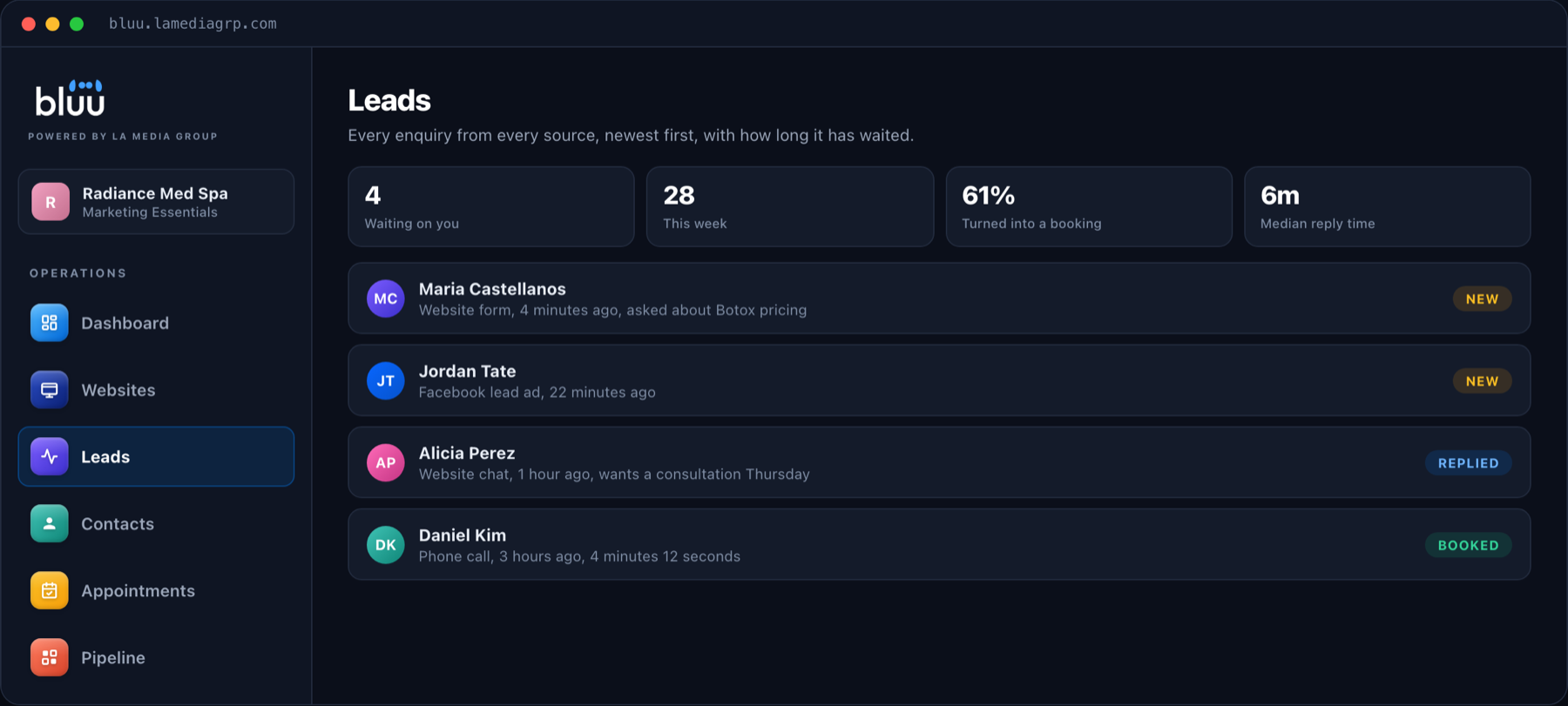
The fix is to send every call into the same inbox as your forms, chats and bookings, as a lead with its source, length, recording and whether it was answered.
How Call Tracking Works With Bluu
Bluu connects directly to CallRail. You paste your CallRail key, pick the business, and Bluu sets up the connection inside your CallRail account for you. If another agency already has a webhook on your account, Bluu adds itself alongside it rather than replacing it, so nothing they rely on breaks.
From then on, every call arrives in the Bluu Leads inbox as a lead, showing who called, where they came from, how long the call lasted and the recording, with missed calls flagged first so they get returned. Each caller becomes a contact in the CRM automatically. Other call tracking tools can send their calls in through a webhook.
Talk to a real person
Want Every Call Tracked to Its Source?
On a 20 minute call we will show you calls, forms and chats landing in one inbox with their source. Month to month, with no contracts.
A Quick Call Tracking Buying Checklist
- Does it support dynamic number insertion on your website?
- Can it attribute calls to campaigns and keywords?
- Does it record calls, with a consent greeting?
- Does it flag missed calls?
- Does it send calls to Google Ads and Google Analytics as conversions?
- Does it send calls into your CRM as leads automatically?
- What will a realistic month cost once numbers and minutes are included?
Frequently Asked Questions
What is call tracking software?
Call tracking software uses unique phone numbers for each marketing source and forwards them to your business line, so you can see which ad, search or campaign produced every call, along with recordings and call details.
What is dynamic number insertion?
Dynamic number insertion changes the phone number displayed on your website based on how each visitor arrived, so calls can be traced back to specific channels, campaigns and keywords.
How much does call tracking cost?
Published entry plans for popular tools start from roughly $30 to $80 a month at the time of writing, plus usage such as extra numbers and call minutes. Check each vendor for current pricing.
Is it legal to record business calls in Florida?
Florida requires the consent of everyone on a call before it is recorded, so use a short greeting telling callers the call may be recorded. If you are unsure about your situation, ask a qualified legal professional.
Does Bluu work with CallRail?
Yes. Bluu connects directly to CallRail and turns every call into a lead in your inbox, with the source, duration, recording and a clear flag on missed calls.
Do I need call tracking if most of my leads come from forms?
If even a few of your customers call rather than fill in a form, yes. Phone leads are usually the highest value, and without call tracking the campaigns producing them can look like they are failing.
The Bottom Line
The best call tracking software is the one that shows you where your calls come from and makes sure every one of them is followed up. Choose a tool with dynamic numbers, recordings, missed call alerts and real integrations, then send every call into the same inbox as the rest of your leads.
If you want to see calls, forms and chats in one place for your business, book a call or send us a message.