
In this article
- What Is a CRM, in Plain English?
- Signs Your Business Needs a CRM
- What a Small Business CRM Should Do
- How Much Does a CRM Cost?
- The Pipeline: Where Leads Become Customers
- Common CRM Mistakes Small Businesses Make
- How Bluu Handles Customer Relationships
- Getting Your Team to Actually Use It
- How to Choose the Right CRM
- Frequently Asked Questions
- The Bottom Line
If you have ever lost a customer because a sticky note went missing, you already understand why a small business CRM matters. CRM stands for customer relationship management, and despite the corporate name, the idea is simple: one place that holds every customer, every conversation and every next step, so nothing depends on somebody's memory.
Big companies have used CRMs for decades. What has changed is that the software is now affordable and simple enough for a local business with two or three people answering the phone.
This guide explains what a CRM actually does, what it costs, the mistakes small businesses make when they buy one, and how to choose one your team will really use.
Key takeaways
- A CRM is the single place every customer, enquiry, conversation and follow up lives, so nothing relies on memory.
- For a small business, the most valuable feature is not reporting, it is never missing a follow up.
- The best CRM is the one that fills itself in from your website forms, chat and bookings, so nobody has to type.
- Watch for per-user pricing, which makes a CRM more expensive every time you hire.
What Is a CRM, in Plain English?
Think of a CRM as an address book with a memory. It knows who each person is, how they found you, every time they have contacted you, what they bought, and what you promised to do next.
Instead of searching your inbox, your phone and a notebook to remember what you said to someone last month, you open their record and it is all there, in order.
A good CRM for small business does four things:
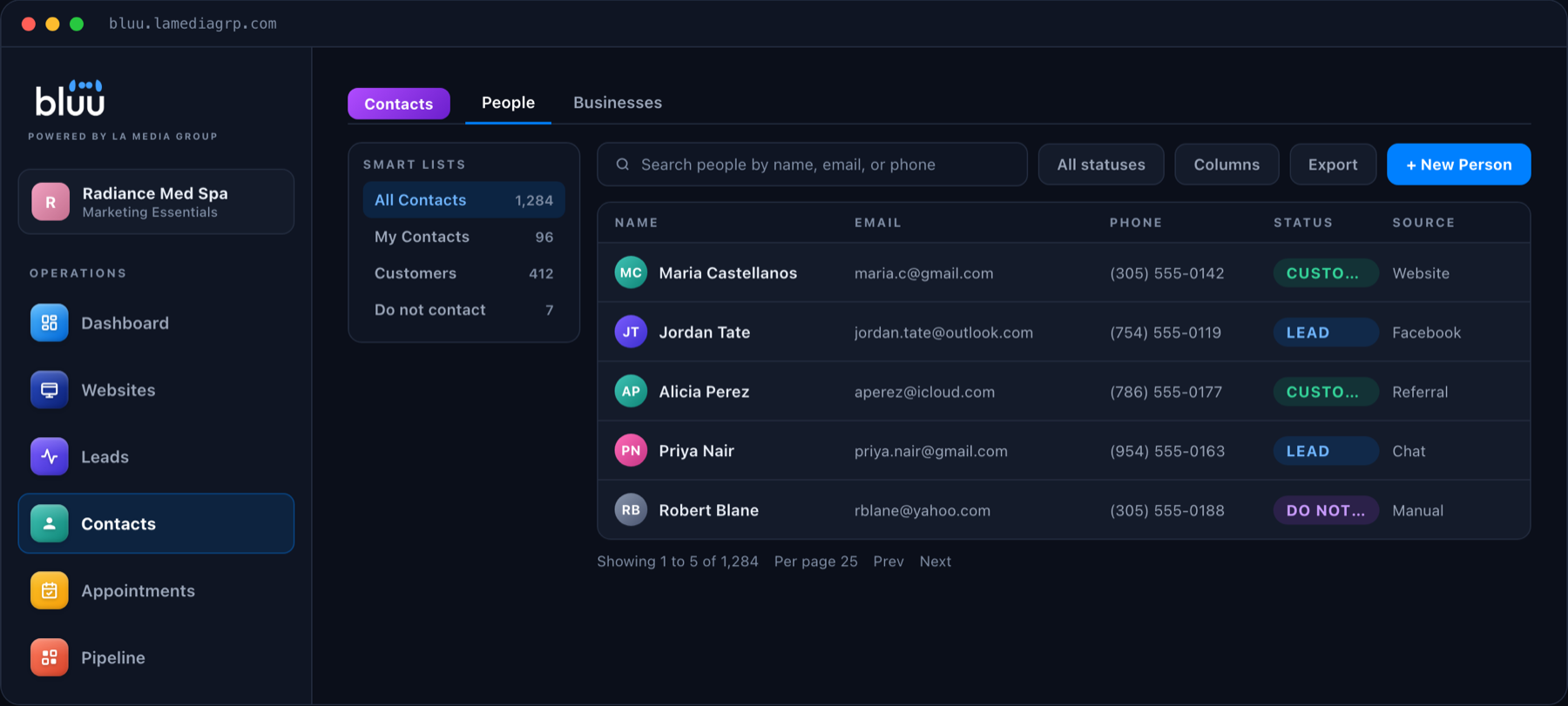
- Stores every contact in one place, people and the businesses they belong to.
- Records every interaction automatically, including forms, chats, calls, bookings and notes.
- Reminds you what to do next, so a quote never goes unanswered for a week.
- Shows you where every deal stands, from first enquiry to paying customer.
Signs Your Business Needs a CRM
You do not need a CRM because you are big. You need one when the cost of forgetting something gets real. Here are the usual signs:
- Enquiries arrive by phone, email, website forms, chat and social media, and nobody sees all of them in one place.
- You have lost a job because nobody followed up in time.
- Customer details live in a spreadsheet only one person understands.
- When a staff member is off sick, nobody else knows where their conversations stand.
- You cannot easily answer "how many new enquiries did we get last month, and how many became customers?"
If two or more of those sound familiar, a CRM will pay for itself quickly, mostly by catching the leads you are currently losing.

What a Small Business CRM Should Do
Enterprise CRMs are packed with features that a local business will never touch. These are the ones that actually matter.
It Fills Itself In
The biggest reason small businesses stop using a CRM is that somebody has to type everything in. The CRM worth having is connected to your website, so when someone fills in a form, starts a chat or books an appointment, they become a contact on their own, with everything they told you attached.
It Keeps One Record Per Person
The person who chatted on Monday and booked on Thursday should be one contact with one history, not two. A CRM that matches returning customers by email or phone saves you from a database full of duplicates.
It Reminds You
Set a reminder on a contact and the CRM tells you when it is due. This one feature prevents more lost business than any report ever will.
It Shows the Pipeline
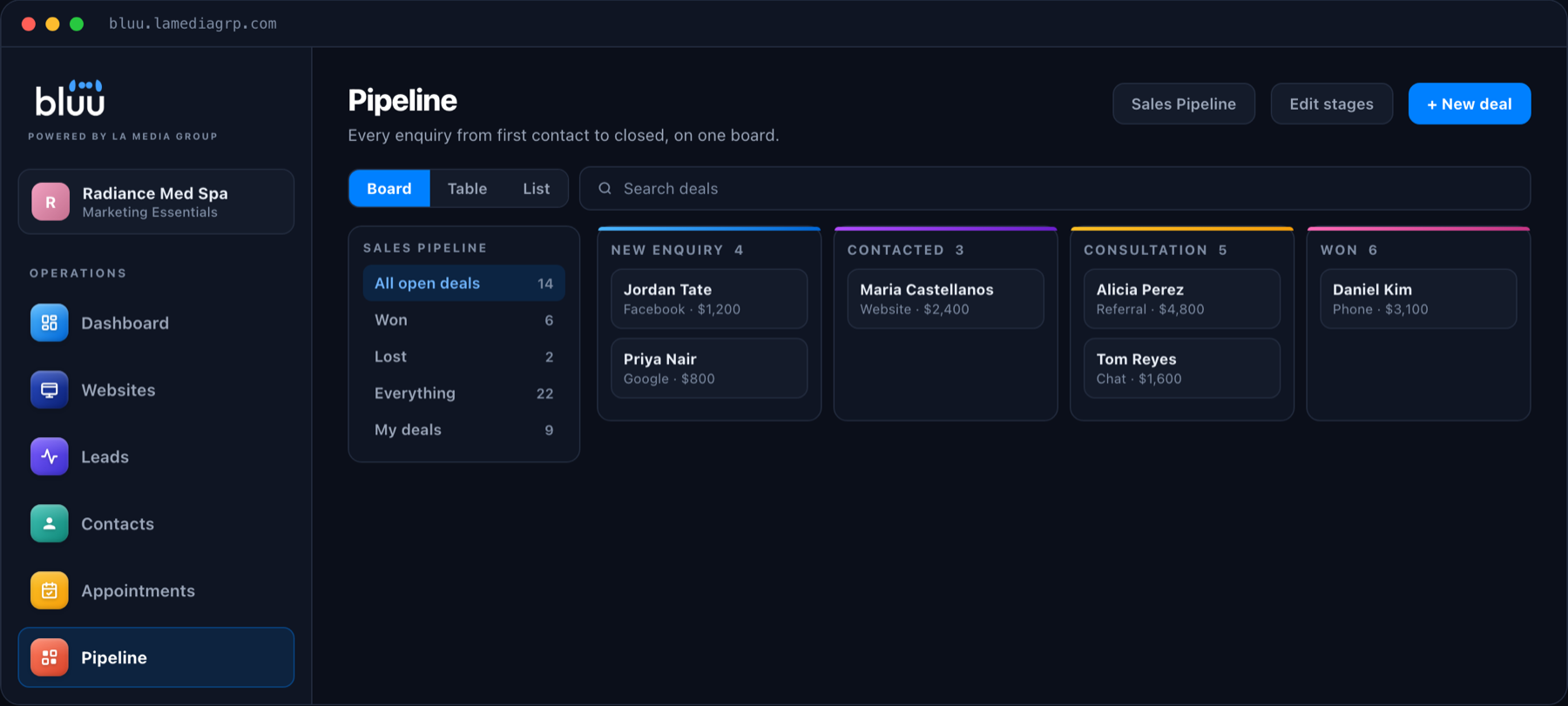
A pipeline is a simple board with columns like New enquiry, Contacted, Quote sent and Won. Each deal sits in a column and moves across as it progresses. At a glance you can see what is stuck and what needs a nudge.
It Holds the Files Too
Quotes, signed forms, photos and documents belong with the customer they relate to, not in a shared drive nobody can search. A CRM that stores files on the contact saves a lot of hunting.
How Much Does a CRM Cost?
CRM pricing ranges from free starter plans to hundreds of dollars per user every month. For a small business, published prices for popular tools look like this: HubSpot Starter lists at around $50 a month, and Pipedrive at around $39 a month per user.
The number to watch is that per-user part. A CRM that costs $39 a month for one person costs $117 a month for three, and that is before you add forms, booking and chat, which most CRMs either charge extra for or leave out entirely.
When you compare prices, compare the whole picture: the CRM, plus the tools you would need around it to feed it.
The Pipeline: Where Leads Become Customers
The pipeline deserves its own section, because it is the part of a CRM that turns a list of names into revenue.
Every enquiry starts as a deal in the first column. When you call them, it moves to Contacted. When you send a quote, it moves again. The best pipelines also act on those moves: send a follow up email two days after a quote, remind the owner if a deal has not moved in a week, or log a note on the customer automatically.
That is the difference between knowing you should follow up and actually doing it every time.
Common CRM Mistakes Small Businesses Make
- Buying a CRM built for a sales team of fifty. If it takes a week of training, your team will not use it.
- Leaving it disconnected from the website. A CRM that has to be filled in by hand will be empty within a month.
- Tracking everything and acting on nothing. Start with contacts, reminders and a simple pipeline. Add the rest later.
- Forgetting per-user pricing. Check what it costs when every person who answers enquiries has a login.
- Keeping the old spreadsheet "just in case". Two sources of truth means neither is the truth.
Talk to a real person
Want a CRM That Fills Itself In?
We will show you, on a 20 minute call, how every form, chat and booking on your site becomes a contact on its own. Month to month, with no contracts.
How Bluu Handles Customer Relationships
We built Bluu for exactly the kind of business this guide is written for. Its Contacts app is the CRM, and every other app writes into it: a form submission, a website chat, an online booking or a phone call from call tracking all land on the same customer record.
Each contact carries their full timeline, notes, reminders, files and any deals in the Pipeline. There is no charge per staff login, so adding a receptionist does not add a bill. Bluu is $199 a month with a one time $199 setup, and it works with the website you already have.
Getting Your Team to Actually Use It
The most common reason a CRM fails has nothing to do with the software. It is that the team keeps working the old way, and the CRM slowly goes stale.
Three habits fix that. First, make the CRM the only place enquiries are tracked, and retire the spreadsheet on day one. Second, start every morning in the same screen: new leads, overdue reminders, deals that have not moved. Third, keep it simple for the first month. Contacts, reminders and a basic pipeline are enough. Once everyone is using those every day, add the rest.
When the CRM fills itself in from your website, the team only has to do the part that needs a person: the call, the quote and the follow up.
How to Choose the Right CRM
Ask these questions before you commit to any CRM, ours included:
- Does it create contacts automatically from my website forms, chat and bookings?
- Does it recognize a returning customer, or create a duplicate?
- Can I set reminders and see what is overdue?
- Is there a simple pipeline I can understand in five minutes?
- What does it cost for every person on my team, not just one?
- Is there a contract, and can I export my data if I leave?
Frequently Asked Questions
What does CRM stand for?
CRM stands for customer relationship management. In practice it means software that stores every customer, every conversation and every follow up in one place.
Does a small business really need a CRM?
If you have more enquiries than you can comfortably remember, yes. The main benefit for a small business is not reports, it is that no enquiry or follow up gets forgotten.
What is the difference between a CRM and a spreadsheet?
A spreadsheet stores names. A CRM stores the relationship: every form, chat, call and booking, plus reminders and where each deal stands. It also fills itself in from your website, which a spreadsheet never will.
How much does a CRM cost for a small business?
Published prices for popular CRMs start around $39 to $50 a month, often per user. The real cost depends on how many people need a login and which extra tools you need around it.
Can I import my existing contacts?
Yes. Most CRMs, including Bluu, let you import your existing contacts from a spreadsheet so you start with your full customer list.
The Bottom Line
A CRM is not a corporate luxury. It is the difference between a business that remembers every customer and one that relies on whoever happened to answer the phone. Choose one that fills itself in from your website, keeps one record per person and reminds you what to do next, and it will pay for itself in the follow ups you stop missing.
If you would like to see what that looks like for your business, book a call or send us a message.