
In this article
- Why Online Appointment Booking Matters
- What a Good Online Booking System Needs
- How to Reduce No-Shows
- What to Ask When Customers Book
- Where to Put Your Booking Link
- Booking by Phone Still Matters
- How Online Booking Works in Bluu
- Common Online Booking Mistakes
- Frequently Asked Questions
- The Bottom Line
Think about when your customers actually decide to book. It is rarely 10am on a Tuesday when your front desk is free. It is late in the evening, on a lunch break, or on a Sunday while they are thinking about the week ahead. Online appointment booking is how you catch those customers, instead of hoping they remember to call you back during business hours.
Plenty of people, especially younger customers, would rather not phone at all. If the only way to book with you is a call, some of them simply book with whoever lets them do it online.
This guide covers why online booking matters, what a good booking system needs, the mistakes that cause double bookings and no-shows, and how to set it up properly.
Key takeaways
- Online appointment booking captures customers outside business hours, when many of them actually decide.
- A good system shows only real availability, in your local time, and blocks out time already taken in your calendar.
- Automatic reminders by email and text are the simplest way to reduce no-shows.
- Put the booking button everywhere: your website, your Google Business Profile, your social profiles and your email signature.
Why Online Appointment Booking Matters
Every time a customer has to call to book, three things can go wrong. The line is busy, nobody answers, or they intend to call later and forget. Each one is a lost appointment you never even knew about.
Online booking removes all three. The customer sees open times, picks one and gets a confirmation, in under a minute, at any hour. Your front desk spends less time on the phone, and the calendar fills up while you are closed.
It also changes who books with you. Customers comparing two businesses at 9pm will usually book with the one that lets them do it right now.
What a Good Online Booking System Needs
Not all booking tools are equal. These are the features that separate a booking page that fills your calendar from one that causes problems.
Real Availability, Not a Guess
The booking page should only offer times you can genuinely do. That means your working hours, the length of each service, any buffer you need between appointments, and anything already booked.
Your Time Zone, Always
This sounds obvious and is often wrong. If a customer in another state opens your booking page, the times should be shown in your local time, clearly labeled, so a 9am appointment means 9am at your door. Booking tools that show times in the visitor's own time zone cause people to arrive hours early or late.
Your Calendar, Respected
If you have a dentist appointment in your own Google Calendar on Monday at 9, nobody should be able to book you then. The best systems read your calendar and block that time out automatically, and put every new booking straight into it.
Each Person's Own Hours
If customers can choose who they see, each person needs their own hours and their own calendar. Otherwise the booking page offers one person's Thursday for somebody who does not work Thursdays.
Holidays and Closures
You should be able to close a single day, a week of vacation or a public holiday in one step, without rewriting your whole schedule and forgetting to change it back.
How to Reduce No-Shows
A no-show is an empty slot you cannot resell. These steps make a real difference:
- Send a confirmation immediately with the date, time, address and what to bring.
- Send reminders before the appointment. A day before and an hour or two before both work well.
- Make rescheduling easy. A customer who can move their appointment is far less likely to simply not turn up.
- Ask a question or two when they book. Customers who have told you what they need are more committed than those who clicked a time.
- Confirm the location. For virtual appointments, include the video link in every message.
What to Ask When Customers Book
A booking form should be short, but a question or two at the right moment saves time on both sides. Ask only what you genuinely need before the appointment.
- What they need help with. One short question tells you how to prepare, and tells you whether they booked the right service.
- Whether they are new or returning. Useful if new customers need longer or need to fill in paperwork first.
- Anything you must know in advance. Access instructions for a home visit, a vehicle make and model, or the size of the job.
- How they heard about you. Optional, but it tells you which of your marketing is producing bookings.
Every extra question loses a few people, so keep it to what changes how you prepare. The answers should land with the booking, on the customer's record, where whoever sees them next can read them without asking again.
Where to Put Your Booking Link
A booking page nobody can find books nobody. Put your link in every place a customer might decide to book:
- a Book now button in your website header and on every service page
- your Google Business Profile, which has a dedicated booking link field
- your Instagram and Facebook profiles
- your email signature and your text message replies
- your website chat, so the chat can book or hand over the link
If you run ads, send people to a thank-you page after they book. That is what lets Google Ads and Facebook count the booking as a conversion, so you can see which ads actually fill your calendar.
Booking by Phone Still Matters
Online booking does not replace the phone, it takes the pressure off it. Some customers will always call, and your team should be able to book them into the very same calendar, assign them to the right person and move them to someone else if plans change, all without creating a second system to keep in sync.
The best booking system is the one your customers use online and your staff use on the phone, without either one ever double booking the other.
How Online Booking Works in Bluu
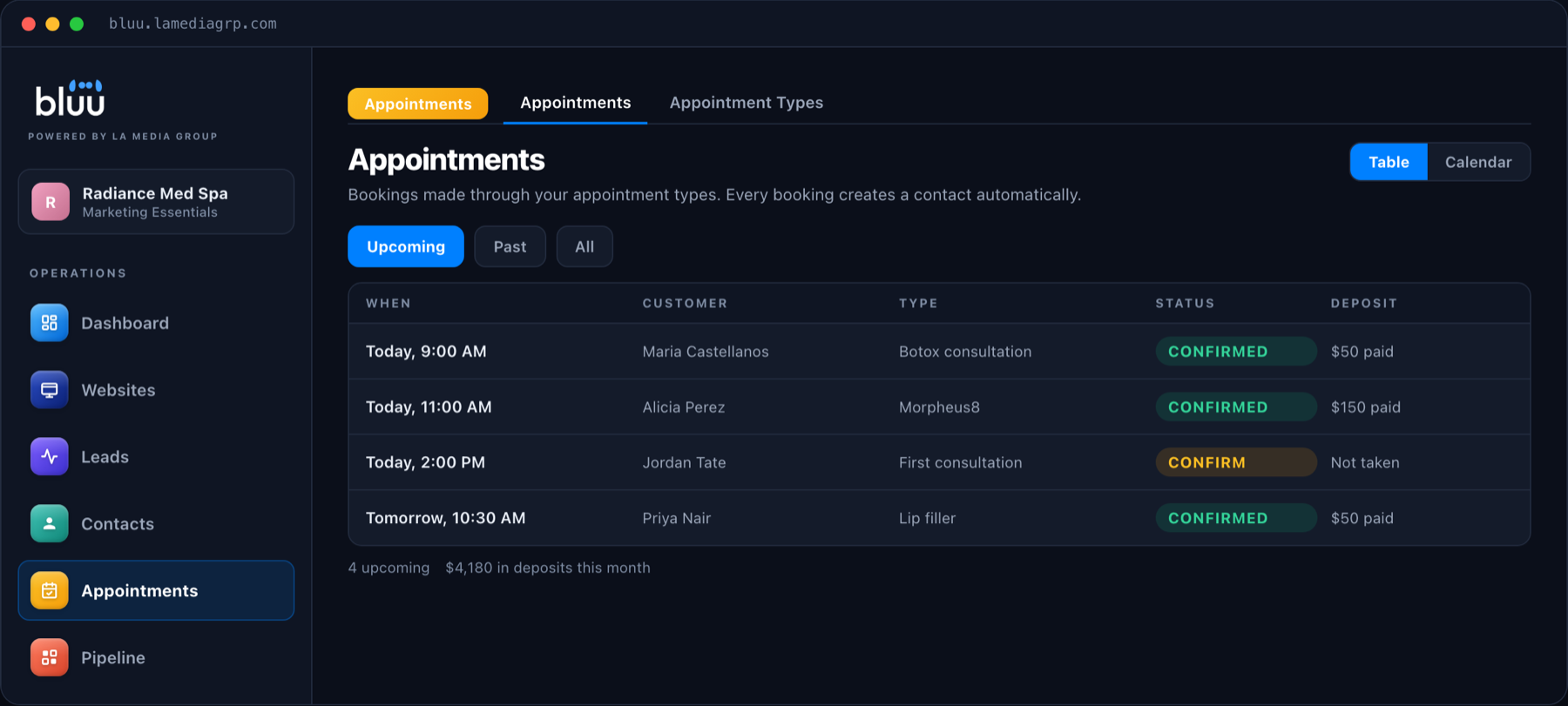
The Appointments app in Bluu gives you a booking page you can link to or embed on your website, with appointment types, lengths and your own hours. Times are always shown in your business's local time.
It connects to Google Calendar, so new bookings land there automatically and, if you switch it on, time you are already busy in Google is blocked on your booking page. Each team member can keep their own hours and their own calendar, and you can close single days or holidays in one step. Customers get confirmations and reminders by email and text, and virtual appointments can use Google Meet or your own Zoom or Teams link.
Your staff can book phone customers into the same calendar, and the AI chat on your website can book appointments too, so a visitor at 11pm can go from question to confirmed booking without waiting for anybody.
Talk to a real person
Want a Calendar That Fills Itself?
On a 20 minute call we will show you a booking page set up for your business, connected to your calendar. Month to month, with no contracts.
Common Online Booking Mistakes
- Showing times in the visitor's time zone instead of yours.
- Not connecting your calendar, so personal appointments get double booked.
- Hiding the booking link on a single page nobody visits.
- Skipping reminders, then wondering why people do not show up.
- Running two calendars, one for online bookings and one for phone bookings, and trying to keep them in sync by hand.
- Offering every slot with no buffer between appointments, leaving no time to reset.
Frequently Asked Questions
What is online appointment booking?
It is a booking page where customers can see your real availability and book an appointment themselves, at any time, without phoning. The booking goes straight into your calendar, and the customer gets a confirmation and reminders automatically.
Will online booking cause double bookings?
Not if it is set up properly. A good system only offers times that are genuinely free, checks your connected calendar, and refuses a slot that has just been taken by someone else.
How do I reduce no-shows for appointments?
Send an instant confirmation and automatic reminders by email and text, make rescheduling easy, and ask a question or two at booking so the customer is committed. Those steps together make a noticeable difference.
Can customers choose which staff member they see?
Yes. In Bluu, an appointment type can offer a choice of people, and each person keeps their own working hours and their own calendar.
Does it work with Google Calendar?
Yes. Bluu connects to Google Calendar, so bookings appear there automatically and, if you choose, time you are busy in Google Calendar is blocked on your booking page.
Can I take bookings for virtual appointments?
Yes. An appointment type can be virtual, and the confirmation and reminders include the joining link. In Bluu that can be a Google Meet created for each booking, or your own Zoom or Teams link.
Can my staff still book appointments over the phone?
Yes. Your team can book phone customers into the same calendar the booking page uses, assign them to the right person and move them later if plans change, so there is never a second calendar to keep in sync.
The Bottom Line
Online appointment booking is one of the simplest ways to win customers you are currently losing, the ones who decide at night and will not call. Show real availability in your own time zone, respect your calendar, send reminders, and put the booking link everywhere. Your calendar will start filling while you sleep.
If you want to see it set up for your business, book a call or send us a message.