In this article
- Why Social Media Scheduling Works
- What Should a Small Business Post?
- How Often Should You Post?
- Which Social Media Channels Matter?
- Plan a Month of Posts in One Afternoon
- Make Every Post Work Harder
- Measure What Matters
- Do Not Forget the Comments
- How Social Media Scheduling Works in Bluu
- Common Social Media Mistakes
- Frequently Asked Questions
- The Bottom Line
Most small business owners know they should post on social media more often. The problem is not knowing what to say, it is finding the time to say it, every day, on four or five different apps. Social media scheduling solves that: you plan and write your posts in one sitting, choose when each one goes out, and let them publish on their own while you get on with running the business.
Done well, an afternoon a month is enough to keep every channel active. Done badly, social media becomes a daily chore that gets dropped the first busy week.
This guide covers why scheduling works, what to post, how often, which channels matter, and how to manage it all from one place.
Key takeaways
- Scheduling lets you write a month of posts in one sitting and publish them automatically, at the times your customers are online.
- Consistency matters more than volume. Three good posts a week, every week, beats a burst followed by silence.
- Posting to every channel from one place saves the most time of anything you can do.
- Do not forget the comments. Replying quickly is what turns followers into customers.
Why Social Media Scheduling Works
Posting live, by hand, has three problems. You have to stop what you are doing at the right moment, you have to log into each app separately, and on busy days it simply does not happen.
Scheduling fixes all three. You batch the work into one session, write each post once and publish it to several channels, and the posts go out on time whether you are with a customer or on vacation. Your profiles stay active, which is what both the platforms and your customers notice.
What Should a Small Business Post?
Running out of ideas is the main reason businesses stop posting. Rotate between a handful of reliable post types and you will never be stuck.
- Behind the scenes. Your team, your workspace, a job in progress. People buy from people.
- Before and after. One of the most effective posts for any service business that changes how something looks.
- Customer stories. A real review or thank-you, shared with permission.
- Tips and how-tos. Short, useful advice that shows you know your trade.
- Offers and news. New services, seasonal availability, events and openings.
- Questions. Ask your audience something simple. Comments help your posts reach more people.
- Local moments. Community events, local landmarks, the season. It reminds people you are nearby.

How Often Should You Post?
There is no single right answer, but there is a wrong one: posting a lot for two weeks and then nothing for two months. Pick a pace you can keep up.
For most local businesses, three to five posts a week on your main channels is a strong, sustainable rhythm. Short videos and stories can go out more often if you have them, but consistency always matters more than volume.
As for timing, there is no universal best hour. Look at when your own followers are online, which most platforms show in their insights, and schedule for those windows. For many local businesses that means early morning, lunchtime and early evening, when people are checking their phones between other things. Test a few times for a month and keep the ones that work.
Which Social Media Channels Matter?
You do not need to be everywhere. Focus on where your customers already are.
- Facebook remains the broadest local audience, especially for customers over 35.
- Instagram suits anything visual: food, beauty, homes, fitness, design.
- Google Business Profile posts appear right in Google search and Maps, where people are actively looking for a business like yours.
- LinkedIn works for businesses that sell to other businesses, and for professional services.
- TikTok and YouTube reward short, genuine videos, and can reach far beyond your follower count.
- Pinterest is strong for ideas-driven categories like home, weddings and style.
The best social media plan is the one you will still be following in six months.
Plan a Month of Posts in One Afternoon
- Pick your themes. Choose three or four post types from the list above and rotate them.
- Gather your photos and videos. Go through your phone for the month's best shots.
- Write in one sitting. Draft every caption for the month, keeping each one short and clear.
- Schedule them. Spread them across the month at the times your audience is most active.
- Leave room for the moment. Keep a few slots free for news, events and anything timely.
- Check in daily, briefly. Reply to comments and messages. That part should never be scheduled.
Make Every Post Work Harder
You do not need a new idea for every post. The businesses that keep going for years reuse what works.
- One photo, several posts. A finished job can be a before and after, a short tip about how it was done, and a customer story once the review comes in.
- One video, several channels. A short clip works on Instagram, Facebook, TikTok and YouTube Shorts with only small changes to the caption.
- Answer the same questions publicly. Every question customers ask you in person is a post that will help the next person who wonders the same thing.
- Bring back your best posts. If something did well six months ago, most of your followers have not seen it. Post it again with a fresh caption.
Measure What Matters
Likes are pleasant, but they do not pay the bills. Watch the numbers that point toward customers: how many people saw your posts, how many clicked through to your website, how many messages and comments you received, and which kinds of posts did best. Once a month, look at your top three posts and make more like them.
Do Not Forget the Comments
Scheduling takes care of posting. It does not take care of conversation. When someone comments on your post or asks a question, a quick, friendly reply is what turns a follower into a customer, and it tells the platforms your content is worth showing to more people.
The easiest way to keep on top of comments is to see them all in one inbox instead of checking each app.
How Social Media Scheduling Works in Bluu
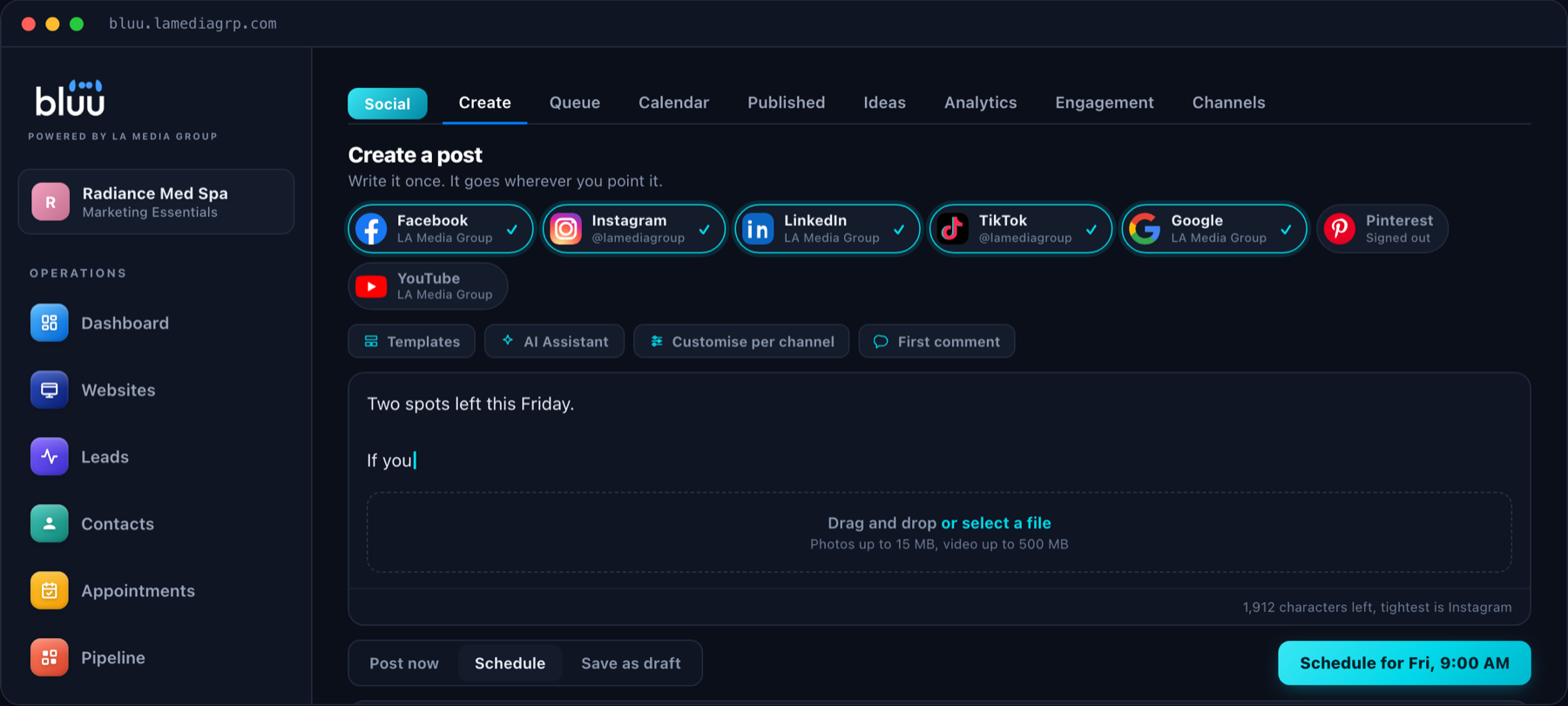
The Social app in Bluu lets you connect Facebook, Instagram, LinkedIn, TikTok, Google Business, Pinterest and YouTube, then write a post once and publish or schedule it to any of them from one composer. A calendar and queue show everything planned, and 128 ready-made post ideas mean you are never staring at an empty box.
If a channel ever disconnects, Bluu tells you straight away so a scheduled post is not quietly missed. Writing, scheduling, the calendar, the queue and every one of your channels are part of your dashboard. For $49 a month, you can add the numbers behind each post, one inbox for comments across your channels, and an AI assistant that writes posts for you.
Talk to a real person
Want Your Social Media Running Without Daily Effort?
On a 20 minute call we will show you a month of posts scheduled across your channels in one sitting. Month to month, with no contracts.
Common Social Media Mistakes
- Posting in bursts. Steady and consistent always beats occasional and intense.
- Only selling. Mix offers in with helpful, personal and behind-the-scenes posts.
- Ignoring comments. Social media is a conversation. Unanswered questions look like nobody is home.
- Being everywhere badly. Two channels done well beat six done poorly.
- Not reusing what works. If a post performed well, make another like it.
Frequently Asked Questions
What is social media scheduling?
Social media scheduling means writing your posts ahead of time and setting them to publish automatically at chosen times, so your channels stay active without you posting by hand every day.
How often should a small business post on social media?
Three to five posts a week on your main channels is a strong, sustainable pace for most local businesses. Consistency matters more than volume.
Can I post to Facebook and Instagram at the same time?
Yes. With a scheduling tool like the Social app in Bluu, you write a post once and publish it to several channels at the same time, or schedule it for later.
Which social media platforms should my business use?
Start where your customers already are. For most local businesses that means Facebook, Instagram and Google Business Profile, with LinkedIn for business-to-business services and TikTok or YouTube if you can make short videos.
What should a small business post on social media?
Rotate between a few reliable types: behind the scenes, before and after, customer stories shared with permission, tips, news and offers, and questions for your audience. A simple rotation means you never run out of ideas.
Should I schedule replies to comments too?
No. Schedule your posts, but reply to comments and messages personally and promptly. That is where followers turn into customers.
Which channels can I schedule to in Bluu?
You can connect Facebook, Instagram, LinkedIn, TikTok, Google Business, Pinterest and YouTube, then write a post once and publish or schedule it to any of them from one composer.
Do I need to post on every platform?
No. Two channels done well beat six done poorly. Start where your customers already spend time, usually Facebook, Instagram and your Google Business Profile, and add others once posting there has become a habit.
The Bottom Line
Social media scheduling turns a daily chore into a monthly task. Pick a few post types, write a month of posts in one sitting, publish to every channel from one place, and spend your daily few minutes on the part that matters most: talking to the people who reply.
If you want to see it set up for your business, book a call or send us a message.